Cut and Paste Photos
- 4.6
- Rating
- 50.00M
- Installs
- Free
- Price
 Analysis by App-foxy
I like photo editors that do one job clearly, and Cut and Paste Photos understands its assignment. This free photography app from ZipoApps is built around removing a subject from one picture and placing it into another, rather than trying to become a complete studio for every possible edit. In my experience, that narrow focus makes it approachable: I can open it with a simple idea, make a playful composite, and avoid getting lost in a crowded collection of professional controls.
That simplicity is also the reason I would not recommend it to everyone. If you want detailed layer management, advanced color correction, or a carefully controlled design workflow, a full editing suite will give you more room to work. But if your goal is to put a person, pet, object, or small visual detail into a different image without learning a complicated editor, this app is easy to understand and surprisingly useful.
What the cut-and-paste workflow feels like in practice
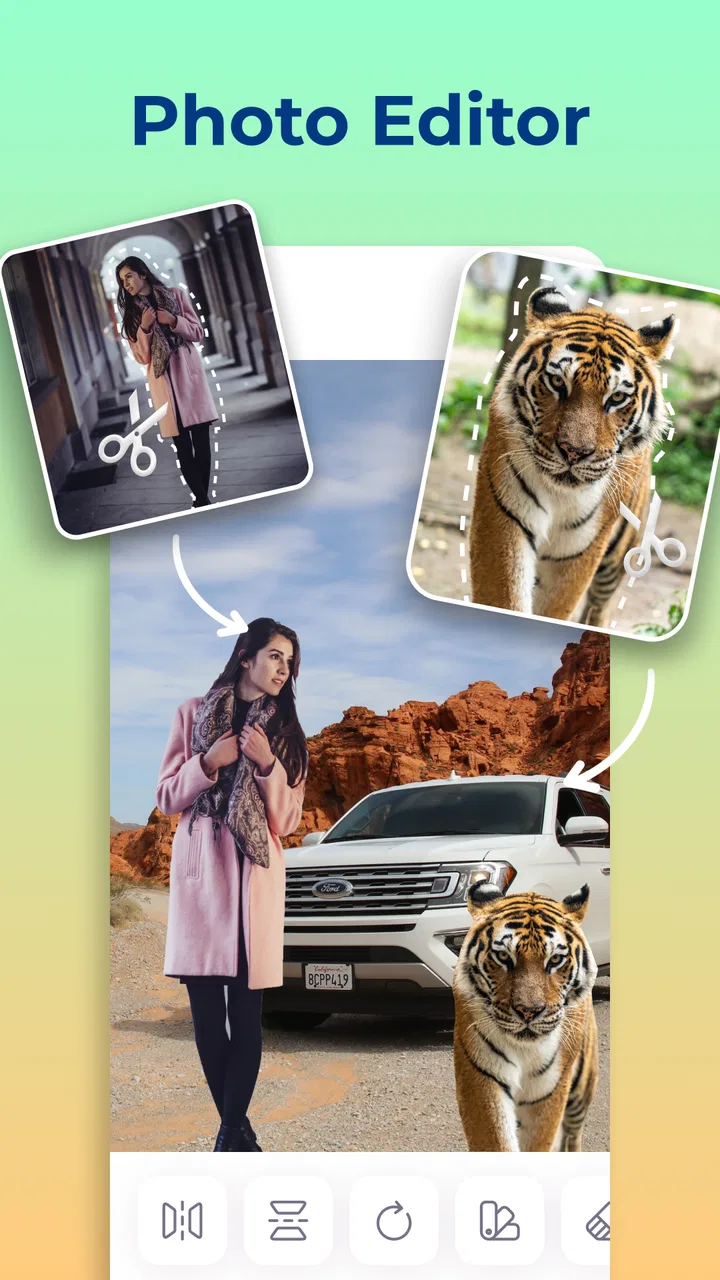
The central process is straightforward. I start with the image containing the subject I want to move, mark the area to keep, and then place that cutout over another photo. The appeal is not just the final effect; it is the short path between an idea and a finished image. I do not need to build a project from several menus before seeing whether the composition works.
You May Also Like

 Blood Strike: 2.5 Anniversary
Blood Strike’s Loadouts Turn Every Drop Into a Tactical Gamble
A close look at Blood Strike’s custom loadouts: how fast access to signature weapons reshapes its battle royale rhythm, rewards preparation, and narrows the gap between fights.

 Pandora - Music & Podcasts
Pandora’s Music Is Easy to Start, but Harder to Recover
Pandora’s strength is its low-effort path from a seed to a station. Its weak spot is how much confidence it asks you to place in connection, setup, and quiet recovery.

 8 Ball Pool
 Is Built on Rivalries, Rematches, and Routine
A close look at the rivalries, rematches, shared routines, and unanswered safety questions that turn a quick pool match into a persistent mobile community.

 Samsung Music
’s Quiet Strength Is Playing What You Already Own
Its reach comes less from spectacle than from dependable access to a personal library. That simplicity is both the app’s strongest retention engine and its ceiling.

 AccuWeather: Weather Radar
AccuWeather Review: A Quick, Clear Forecast for Everyday Decisions
For everyday plans, the best forecast is the one you can understand quickly. AccuWeather makes rain timing, radar, and local conditions easy to act on, with a few trade-offs.

 Hill Climb Racing
Why Hill Climb Racing Still Turns Crashes Into One More Run
A tiny car, a bumpy hill and one more upgrade: Hill Climb Racing keeps resurfacing because its simple chaos makes every near-miss feel personal.
More From Our News Desk



The most important skill is careful selection. A quick outline can be enough for a casual joke or a social post, but hair, fingers, plant leaves, and other irregular edges need more patience. I found it helpful to zoom in before trimming the border, especially when the subject had a background color similar to its clothing. The app is at its best when I treat the cutout as the main creative task instead of expecting an automatic result to look perfect every time.
A useful everyday example is a family photo where one person blinked. I can use a better expression from another shot and place it into the group image, provided the two pictures have reasonably similar angles and lighting. The same approach works for moving a favorite pet into a holiday background, creating a birthday greeting with a friend’s portrait, or making a humorous image by placing an object somewhere unexpected.
The strongest part of the experience is the immediate visual feedback. I can see whether the subject fits the new scene while I am still adjusting it. That makes experimentation less intimidating than in an editor where every change is hidden behind several panels. It also encourages small corrections: resize the cutout, shift its position, and check the edges again before saving.
Why the simple design helps beginners
Many mobile photo editors present filters, retouching tools, templates, drawing controls, and collage options all at once. Those apps can be powerful, but they also make a single cutout job feel unnecessarily large. This one is more focused. Someone who has never worked with layers can understand the basic idea quickly because the creative action is visible: choose a subject, separate it, and combine it with another image.
That focus makes it suitable for quick personal projects. I would use it when I want to create a reaction image for friends, prepare a simple social post, or test a visual joke without opening a desktop editor. It is also a comfortable starting point for a child or casual user because the app is rated Everyone. Adults should still guide younger users when images involve other people, but the editing concept itself is easy to grasp.
The app has been available since Apr 25, 2018, and its current version is 2.6.8. It runs on Android devices using version 6.0 or later, which gives it a broad reach across older and newer phones. That matters for this kind of utility: a quick creative tool is more useful when I can install it on a spare or aging device instead of needing recent hardware.
Small techniques that improve the finished image
My first practical tip is to choose source and destination photos with similar light direction. A neatly cut subject can still look pasted on if one image has a bright face and the other is shaded from the opposite side. Matching the general brightness before cutting saves time later because the app’s main strength is composition, not rebuilding the lighting of a scene.
My second tip is to leave a little breathing room around complicated edges during the first selection. I can then refine the outline rather than accidentally cutting into hair or clothing. This is especially useful with transparent objects, thin straps, and branches, where rushing produces a visibly artificial border. A clean silhouette usually matters more than adding several decorative elements.
My third tip is to prepare the background image first. I decide where the subject should stand and how large it should appear before doing detailed edge work. There is little value in spending time perfecting a cutout that later needs to be cropped heavily. This order also helps with perspective: if the destination scene is viewed from far away, a slightly less exact edge may be acceptable, while a close-up demands much more care.
A fourth useful habit is to keep the composition restrained. One carefully placed subject often looks more convincing than a crowded scene containing many unrelated cutouts. The app makes playful combinations possible, but restraint is what separates a readable joke or greeting from a messy collage. I would rather spend time aligning one person’s feet with the ground than add several objects that compete for attention.
Where the result can look less convincing
The main weakness is the boundary between a quick edit and a polished composite. The app makes the first category accessible, but realistic results still depend heavily on the original images and the care taken during selection. If the source has motion blur, a busy background, or fine details around the subject, the cutout may need repeated corrections. Users expecting one-tap professional masking may find the process more manual than the store summary suggests.
Placement also requires judgment. A subject can be technically separated from its background yet still appear wrong because its scale, angle, or position does not match the destination. For example, putting a close-up portrait into a distant landscape creates an obvious mismatch even when the outline is clean. I recommend checking the person’s eye level and apparent camera distance before deciding that the app has failed.
Another limitation is the app’s narrow purpose. It is not the editor I would choose for a long photo project involving detailed typography, complex retouching, extensive color grading, or a large set of adjustable layers. A conventional collage maker may be better when the goal is arranging several complete photos in a grid. A professional mobile editor is the stronger choice when I need precise masks, blend modes, shadows, or repeated revisions.
There is also a practical cost consideration. The app is free to download, but it includes in-app purchases ranging from $0.99 to $149.99 per item. I would check the purchase screen carefully before confirming anything, particularly if I am handing the phone to a child or only want to try the basic workflow. The free entry point makes it easy to test, but users who dislike optional spending inside creative apps should keep that model in mind.
How it compares with familiar alternatives
Compared with a standard collage app, Cut and Paste Photos gives me more control over the individual subject. A collage usually keeps each original image intact, while this workflow lets me isolate one part and build a new scene around it. That makes it better for a visual prank, a personalized greeting, or a replacement detail than for a neat multi-photo layout.
Compared with a full mobile editor, it is quicker to learn but less flexible. A larger editor may let me refine masks with greater precision, adjust shadows, blend colors, and maintain several editable layers. That extra control is valuable for client work or polished artwork, but it also adds menus and decisions. I prefer this app when speed and accessibility matter more than fine production control.
Compared with automatic background-removal tools, the advantage here is the direct connection between cutting and placing. I am not only deleting a background and stopping there; I am using the isolated element as part of a new composition. The trade-off is that the quality of the final image still depends on my choices. For a clean product-style cutout with no further creative changes, a dedicated background remover may be more efficient.
Who will get the most from it
I think this is a good fit for casual creators, families, students, and social media users who want to make personalized images without studying a professional editor. It is also useful for anyone who often thinks, “This person would look funny in that picture,” because the app turns that idea into a manageable sequence of actions. The free price makes trying the basic experience less of a commitment.
It can also serve as a teaching tool. A beginner can learn the practical foundations of masking and composition by making small edits: isolate a toy, place it on a different background, and notice how scale and alignment affect realism. That experience is more meaningful than simply applying a filter because it teaches why an image looks believable or artificial.
I would suggest skipping it if you need dependable precision for professional deliverables, extensive typography, or advanced retouching. I would also choose another option if my main interest is automatic enhancement rather than creative rearrangement. The app rewards users who are willing to outline a subject and make a few visual decisions; it is not designed to replace every other photography tool on a phone.
What the popularity says, and what it does not
The app has reached over 50 million installs and holds a 4.6 average from around 357 thousand ratings, with roughly 4.3 thousand written reviews. Those figures suggest that the basic idea has broad appeal, especially among people looking for a focused editing tool rather than a complete photo workstation. I see that popularity as a reason to try it, not as proof that every edit will be effortless.
Its broad audience makes sense because the concept is immediately understandable. I do not need to know technical photography terms to begin, and the app’s category is clearly photography rather than a general design platform. ZipoApps has kept the product centered on a recognizable task, which is a strength when I want to finish a small project quickly.
Still, popularity cannot solve the creative limitations of the format. The best-looking results require suitable source pictures, sensible placement, and attention to edges. A user who downloads it expecting an automatic professional composite could be disappointed, while someone who enjoys hands-on visual experiments will probably find more value.
My final recommendation
After using it as a focused cutout editor, I see Cut and Paste Photos as a practical, beginner-friendly tool with a clear purpose. It is strongest when I need to move one subject into another image quickly, experiment with a humorous idea, or create a personal visual without the weight of a full editing suite. The workflow is easy to approach, and the app works especially well when the source and destination photos already share similar lighting and perspective.
Its limitations are just as clear. Fine edges can take patience, realistic results require my own judgment, and the narrow feature set will not satisfy users who want a complete professional editor. The in-app purchase range is another reason to review the purchase choices carefully before paying for anything.
My recommendation is simple: try it if your priority is fast, approachable subject replacement and you enjoy making playful or personal images. I would point a serious photographer, designer, or retoucher toward a more advanced alternative. For everyone in between, this free app is worth exploring because it makes a normally technical editing idea feel manageable without pretending that good compositing requires no effort.
In short, Cut and Paste Photos earns its place as a specialized photography app rather than an all-purpose editor. It does not need to do everything to be useful. When the project matches its central idea, it gives me a direct route from an ordinary photo to a customized composition, and that is a recommendation I can comfortably make to a friend.
FAQs for Cut and Paste Photos
01What is Cut and Paste Photos and what can I do with it?
Cut and Paste Photos is an intuitive photo editing app that allows users to seamlessly cut out parts of images and paste them onto other photos. You can create fun collages, swap backgrounds, or craft creative photo montages with ease. It's perfect for unleashing your creativity or enhancing photos for social media.
02Is Cut and Paste Photos easy to use for beginners?
Yes, Cut and Paste Photos is designed with user-friendliness in mind, making it accessible for beginners. The app features a straightforward interface and provides easy-to-follow instructions. Most users find they can quickly learn how to cut, paste, and edit images without any prior experience in photo editing.
03Are there any in-app purchases or ads in Cut and Paste Photos?
Cut and Paste Photos offers a free version with basic features, but it may include ads to support development. For those looking for an ad-free experience and additional features, there is often a premium version available through in-app purchases. It's a good idea to check the app store for current options and pricing.
04What are the device requirements to run Cut and Paste Photos?
Cut and Paste Photos is available for both Android and iOS devices. To ensure optimal performance, your device should run on a relatively recent operating system version. Check the app store listing for specific OS requirements, and ensure you have enough storage space for the app and its creations.
05How does Cut and Paste Photos ensure user privacy and data security?
Cut and Paste Photos prioritizes user privacy by not collecting unnecessary personal information. The app operates locally on your device, so your edited photos are not stored on external servers. Always review the app's privacy policy in the app store to understand how your data is handled and protected.
Pros
- Easy to use interface for quick edits.
- Wide range of backgrounds to choose from.
- Supports high-resolution image exports.
- Offers precise cutting tools for accuracy.
- Integrates well with social media platforms.
Cons
- Contains ads that can be distracting.
- Limited free features; premium needed.
- Occasional app crashes on older devices.
- Editing tools can be a bit simplistic.
- No option for collaborative editing.

Cut and Paste Photos
Gallery